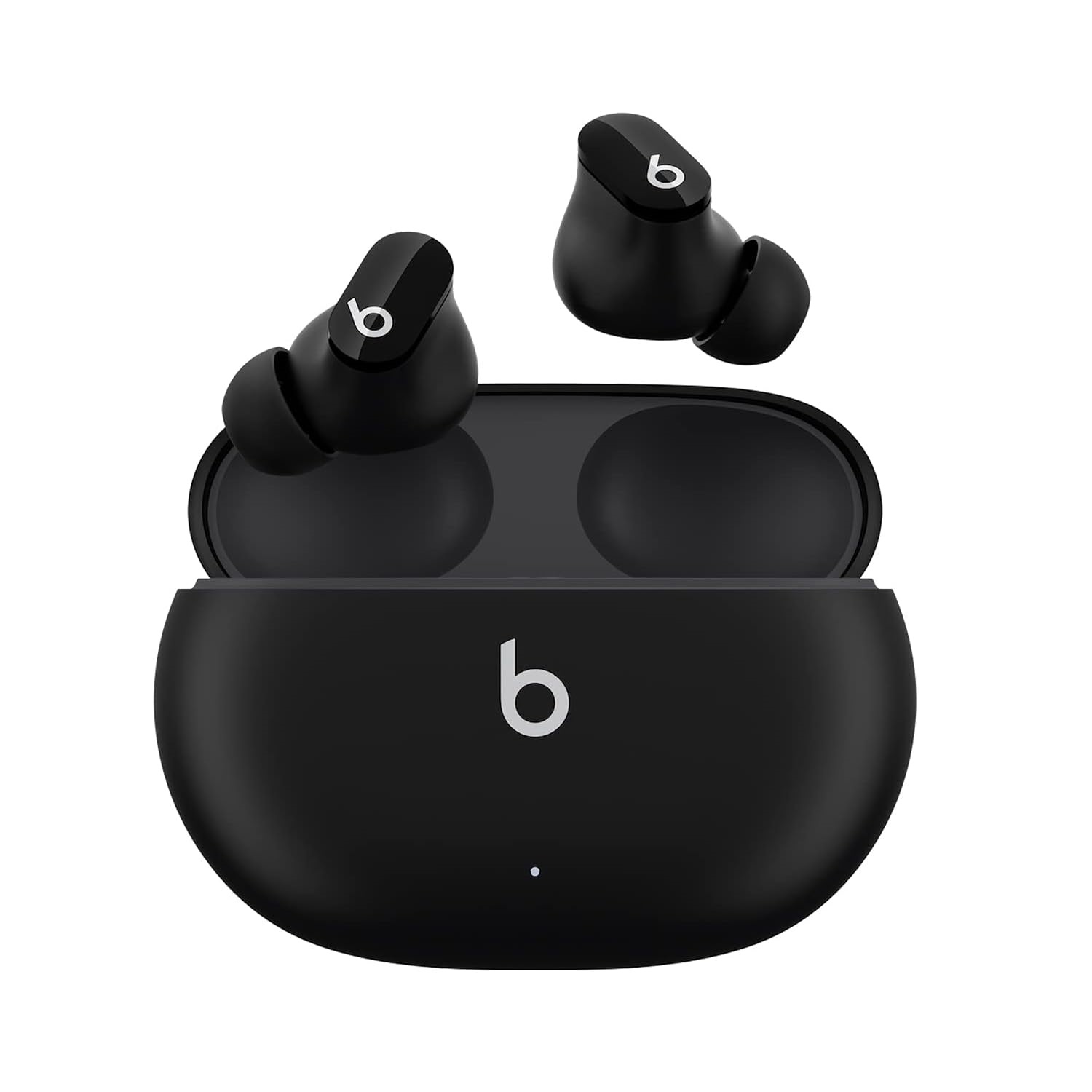
Beats Studio Buds – True Wireless Noise Cancelling Earbuds – Compatible with Apple & Android, Built-in Microphone, IPX4 Rating, Sweat Resistant Earphones, Class 1 Bluetooth Headphones – Black
... people are viewing this right now
Frequently Asked Questions How do you charge them?To charge your Beats Studio Buds, place them in the charging case. When you need to charge both the earbuds and the case, place the earbuds in the case and connect the case to a power source with the USB-C cable that’s included with your Beats Studio Buds. You can also charge the case without the earbuds. (Note: USB-C power adapter sold separately).How do you turn them on and off?Beats Studio Buds automatically power on when they are removed from the case, and power off when placed back in the case with the lid closed.Can you control your music?Beats Studio Buds feature a multi-function button on each earbud. Press once to play or pause, twice to skip forward, or three times to skip backward.How do you control noise cancelling?Hold the multi-function button down to toggle between Active Noise Cancelling (ANC) and Transparency mode.How do I improve the comfort, stability, and sound quality of your Beats Studio Buds?Beats earphones come with several sets of eartips. Choose the pair that’s most comfortable and provides the best sound experience for you. If your earphones don’t already have eartips attached, choose a set of eartips and attach them. Then gently insert the eartip into your ear. You can adjust the eartip until it feels secure. To remove the eartip from your ear, twist the earphone gently and pull it away from your ear.How do I activate Siri or other voice assistants?On Apple devices, you can activate Siri hands-free just by saying “Hey Siri”. Or, change the function of the multi-function button to activate your voice assistant within your iOS settings. On Android, download the Beats app to change the function of the multi-function button to activate the default voice assistant on your device.How do I configure the multi-function button?You can configure the multi-function button to either toggle ANC modes or activate voice assistant. To do this in iOS, tap on the product icon in Control Center and select the “Press and hold” menu to choose your preferred function for each earbud. To do this on Android, download the Beats app from Google Play. Once your product is paired in the app, select the “Press and hold” menu in the product page to choose your preferred function for each earbud.How long does the battery last?Beats Studio Buds can provide up to 8 hours of listening time with ANC turned off, or up to 5 hours of listening time with ANC turned on. The case holds two additional charges for a combined total of 24 hours with ANC off, or 15 hours with ANC on.Do they have a microphone?Beats Studio Buds have multiple microphones on each earbud enabling high-quality call performance. Each earbud has 2 microphones dedicated to ANC and 1 dedicated to voice pickup.How do I pair with my iPhone?Beats Studio Buds are ready to pair right out of the box. On iPhone running the latest iOS, simply open the lid of the case, hold near unlocked phone, and follow on-screen instructions.How do I pair with my Android device?On Android, you can pair your product in a single tap using Google Fast Pair. In order to access the feature, you must have Android 6.0 or later, location enabled, and access to Google Play Services. If you meet those requirements, simply open the lid of the case, hold near unlocked phone, and follow on-screen instructions. You can also pair your product in the standard Bluetooth menu.How do I pair with my Mac or with another device that uses Bluetooth?Make sure that you turned on Bluetooth on your Mac or other device. With the case lid open, hold your Beats Studio Buds next to your Mac or other device. Press and hold the system button on the charging case until the LED blinks. Open the Bluetooth menu on your Mac or other device. For example, on your Mac, choose Apple menu > System Preferences, then click Bluetooth. In the list of discovered Bluetooth devices, tap or click your Beats Studio Buds.How do I pair with additional Bluetooth devices?To pair to additional devices, place the earbuds in the case with the lid open. Then hold down the small circular button until the LED begins to flash. Beats Studio Buds are now in pairing mode and can be paired to any standard Bluetooth device.Can I wear just one earbud?Yes, you can use either earbud independently.How waterproof / water resistant are these?Beats Studio Buds are rated IPX4, which means they are resistant to sweat and water splashing from any direction. The case is not sweat or water resistant.How do I keep my product up to date?Software updates will occasionally be made available to enable new features or improve the product experience. These ‘silent’ updates are automatically enabled when connected to an Apple device. To stay up to date on an Android device, download the Beats app from Google Play. DescriptionTrue wireless noise cancelling Beats Studio Bud are made for music. Designed with a custom acoustic platform, Beats Studio Bud are engineered to deliver powerful, balanced sound in a compact, in-ear form factor. The result immersive sound that pulls the emotion of music from the studio to your ears to keep you inspired. These earphones feature two listening modes, Active Noise Cancelling (ANC) and Transparency mode, to give you total control of your sound. Each earbud has up to 8 hours of listening time? with two additional charges provided by its pocket-sized charging case to give you up to 24 hours of combined playback.? Beats Studio Bud also offer simple one-touch pairing for Apple and Android devices.Features & detailsCustom acoustic platform delivers powerful, balanced soundControl your sound with two distinct listening modes: Active Noise Cancelling (ANC) and Transparency modeThree soft ear tip sizes for a stable and comfortable fit while ensuring an optimum acoustic sealUp to 8 hours of listening time (up to 24 hours combined with pocket-sized charging case)Industry-leading Class 1 Bluetooth for extended range and fewer dropoutsHigh-quality call performance and voice assistant interaction via built-in microphonesIPX4-rated sweat- and water-resistant wireless earbudsBeats wireless headphones and earphones are compatible with Apple and Android devicesWhat’s in the box – Beats Studio Buds true wireless noise cancelling earphones, charging case, ear tips with three size options, USB-C to USB-C charging cable, Quick Start Guide, warranty card (USB-C power adapter sold separately) Spread the love